OurRadioFS is a virtual VHF radio for Microsoft Flight Simulator and X-Plane. Tune a COM frequency and speak to whoever is on it and in range — real radio distance, real fade-out, one shared sky. MSFS and X-Plane pilots share the same frequencies.
Now with voice-controlled ATC, allowing you to communicate with air traffic control using your microphone, receive natural neural ATC voices, and follow IFR flights from departure to arrival.
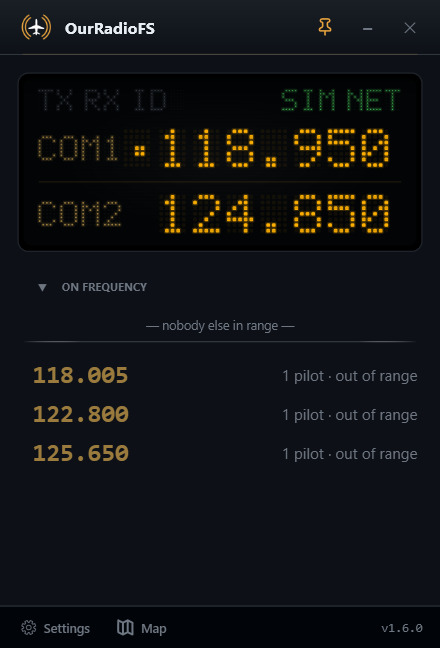
Everything is driven by your sim: your frequency, your position, your altitude. You only hear the people you would actually reach.
Who you hear depends on distance and altitude, computed live — just like a real radio. Fly higher, reach further.
Set your COM1 frequency in the sim, hold your push-to-talk key, and you're on the air with everyone on that frequency.
Voices crackle and fade as pilots drift to the edge of range, so the airwaves feel alive instead of pin-sharp.
Hear the VOR/ILS identifier loud and clear over the engines, with a blinking Morse light on the display.
See who's flying and on which frequency, find someone to fly with, then tune in. You're on it too — one tick box takes you off. Open the map →
Optional MSFS toolbar panel: see who's on your frequency, nearby active frequencies, and mute anyone without leaving the cockpit.
No accounts, no email, no tracking. Voice is relayed live and never recorded. While you fly you appear on the public live map so others can find you — the app asks when it starts, and it's one tick box in Settings.
Grab the free installer for your simulator and run it. No account to create.
Pick your callsign and a push-to-talk key. That's the whole setup.
Tune a COM frequency in the sim and talk to whoever's on it in range.
Pick your simulator — free, no account, Windows 10/11. It is one app for both: it connects to whichever sim you are running, and MSFS and X-Plane pilots share the same frequencies.
MSFS 2020 & 2024 · in-cockpit panel included
Download for MSFSv1.6.4 · ZIP · 76 MB
Alternative download on flightsim.to
X-Plane 11 & 12 · no plugin required
Download for X-Planev1.6.4 · EXE · 76 MB
Alternative download on xplane.to

Built by a single developer, and running on a server that costs real money every month. If it makes your flights better, you can help keep it on the air.
 OurRadioFS